Subscriptions and payments
Subscriptions and payments
Capacities offers a free Basic plan and two paid plans, Pro and Believer. On top of a paid plan you can add an optional Plus add-on (Pro+ for Pro, Believer+ for Believer) that increases your monthly AI budget.
This page explains how the plans and the AI budget work, when to choose each option, and how payments and top-ups are handled. For a feature comparison and current prices, see the pricing page.
Plans at a glance
- Capacities Basic is free and covers the core product.
- Capacities Pro and Capacities Believer unlock the full feature set, including access to all AI features with a small monthly budget to try them out or use sporadically throughout the month. Pro and Believer include the same features. Believer additionally gives you beta access to major new features and supports an independent team.
- Pro+ and Believer+ are optional Plus add-ons on top of Pro or Believer. They give you a much larger monthly AI budget for everyday AI use, and top-ups when you need more. All AI workflows and all models in the picker stay available on Pro and Believer. You can include Plus when you first subscribe, or add it later.
You can subscribe on the pricing page and manage your plan or add-on in the app under Settings > Subscription & Billing.
How the AI budget works
Every Pro and Believer subscriber receives a monthly AI budget that resets at the start of each billing cycle. The budget covers all AI-powered features in Capacities, such as AI chat, the AI panel, AI autofill, auto-tagging, and media analysis of images, audio, and web links. You can check your remaining budget at any time in Settings > AI Assistant.
Every AI feature and every model in the picker is available on the normal Pro plan, so you can try all of them within your included budget. You only need a Plus add-on once that budget is not enough for how you work.
Pro is sized for light monthly use and occasional media. If you analyze media or chat heavily most days, expect to need Plus.
With Pro+ or Believer+, your monthly budget is significantly larger. The add-on is a pass-through: the AI budget you receive each month is roughly equal to what you pay for the add-on, minus transaction fees. Plus also lets you buy top-ups.
What a Plus budget covers in practice
We do not publish fixed “X analyses per month” numbers. Cost depends on the model, file size, and how much context a chat loads. The useful frame is the pass-through amount.
If Plus is about $10 per month in your region, you get roughly that much AI budget each month (minus fees). That is a different scale from the everyday Pro and Believer budget.
With efficient models for media and lighter tasks, a budget around $10 per month is typically enough for:
- Image analysis and OCR: well into the hundreds of analyses in a month if that is your main use
- Weblink analysis: many typical articles across the month
- Autofill and short AI panel actions: usually light; rarely what empties a Plus budget alone
The expensive end is long AI chat and research with costly models. A deep session that reads a lot of your space can spend what dozens of image analyses would. Plus is sized for daily professional AI use. The included Pro and Believer budget is sized for light monthly use and occasional media.
Exact prices: pricing page. Remaining budget: Settings > AI Assistant.
If the monthly Plus budget is still not enough, you can top up at any time with a one-time purchase or auto top-up. Top-ups require an active Pro+ or Believer+ subscription.
When to use Pro+ or Believer+
Stay on Pro or Believer if your everyday AI usage fits within the included monthly budget. Pro is sized for light monthly use and occasional media.
Consider adding Pro+ or Believer+ when you regularly run out of your monthly budget, or when you analyze media or chat heavily most days: many images or weblinks, long research chats, or frequent autofill as part of daily work.
A Plus add-on requires an active Pro or Believer subscription. You can include it when you first subscribe, or add or remove it later in Settings > Subscription & Billing.
Top-ups
With Pro+ or Believer+, you can add AI budget at any time with a top-up. You do not have to wait for the next billing cycle. Top-ups are not available on Pro or Believer without the Plus add-on.
There are two ways to top up:
- One-time top-up: choose a fixed amount (for example 5, 10, or 20 in your local currency) whenever you want more budget. The budget is added immediately and never expires, so unused top-up budget carries over.
- Auto top-up: automatically adds a fixed amount when your top-up budget runs low, up to a monthly limit you set (for example 1, 2, 3, 5, or 10 times per month).
Manage top-ups in Settings > Subscription & Billing. Available amounts depend on your region.
Plans and AI budget FAQ
What is the difference between Pro and Pro+?
Pro is the full subscription with all AI workflows, all models in the picker, and a monthly AI budget for everyday use. Pro+ is an optional add-on that adds a much larger monthly AI budget and top-ups. The same relationship applies to Believer and Believer+.
Do I need Pro+ to use AI features?
No. Every AI workflow and every model is available on Pro and Believer. Pro+ and Believer+ add more budget and top-ups for heavier use.
How much AI budget do I get?
Pro and Believer include a monthly budget sized for light monthly use and occasional media. With Pro+ or Believer+, the budget each month is roughly equal to what you pay for the add-on, minus transaction fees. Exact amounts depend on your region.
Rule of thumb: if Plus is about $10 per month where you are, think of that as roughly $10 of AI spend. On efficient media pipelines that can mean hundreds of image or OCR analyses, many weblink analyses, or a mix. Heavy chat with expensive models spends the same budget much faster. If you analyze media or chat heavily most days, expect to need Plus. See What a Plus budget covers in practice.
What happens when I run out of AI budget?
AI features pause until your budget resets at the start of the next billing cycle. To keep going, add Pro+ or Believer+ for a larger monthly budget. If you already have Plus, buy a one-time top-up or enable auto top-up for immediate extra budget.
Does my AI budget roll over to the next month?
Your monthly subscription budget resets each billing cycle and does not roll over. Top-up budget is different: it never expires, so any unused top-up budget carries over.
What is the difference between a one-time top-up and auto top-up?
A one-time top-up adds a fixed amount once, when you choose to. Auto top-up adds a fixed amount automatically whenever your top-up budget runs low, up to a monthly limit you set, so you do not have to top up manually.
Can I limit how much auto top-up spends?
Yes. When you enable auto top-up, you set how many times per month it is allowed to refill (for example 1, 2, 3, 5, or 10 times). This caps how much can be charged in a month.
Can I get Pro+ without a Pro subscription?
No. Pro+ requires an active Pro subscription, and Believer+ requires an active Believer subscription. You can activate both together at checkout, or add or remove the add-on later in Settings > Subscription & Billing.
Payments FAQ
How do I upgrade to a paid plan?
Please go to Settings > Subscription & Billing and choose from the Pro or Believer Tiers. You can read about the individual tiers (here)https://capacities.io/pricing.
You will be taken to our website to complete the payment. Prices vary by region so please ensure you aren't using a VPN, or the payment will not work.
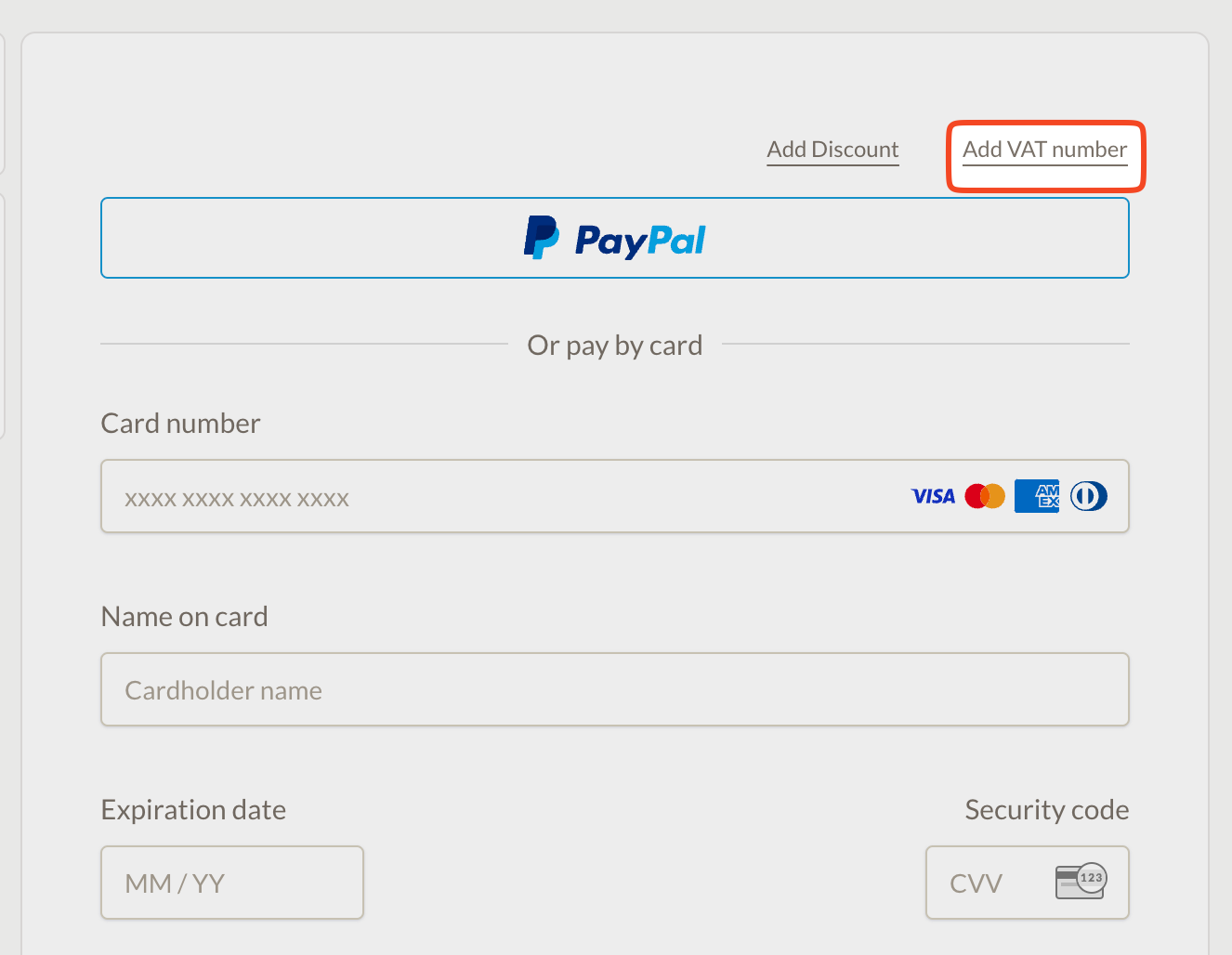
Where do I add a VAT Number?
Please click 'Add VAT Number' in the top right of the payment window in the last step and fill out the necessary details.
My payment isn't working
Please ensure you are not using a VPN or that you are not paying from a country our payment provider, Paddle, doesn't support. You can find the list here.
Unfortunately, we can only accept payments through Paddle, so users from any countries Paddle does not accept payments from will need to use Capacities Basic.
What payment providers do you support?
Capacities supports the following payment methods:
- Credit card
- PayPal
- Apple Pay
- Google Pay
- Many other payment methods
The full list of options available to you will be visible in checkout. Unfortunately, we are unable to support a payment method if Paddle does not support it themselves.
I can't afford the rate shown at checkout due to differences in purchasing power
We offer regional pricing for most currencies. You will see the price in your local currency in the checkout. If your local currency is not supported, checkout will show a supported currency (usually USD). We cannot change this unless Paddle adds support for your currency.
Can I use a VPN to pay?
VPN Payments are not accepted.
How do I upgrade from Pro to Believer?
You can find this in the Settings > Subscription & Billing > Update your subscription.
The payment will be pro-rated, meaning you will be charged the difference between the two plans.
What is an Early Believer?
Early Believers supported Capacities Believer before we launched Capacities Pro. You will see an Early Believer badge in Settings > Account.
With that badge, you keep all Believer benefits (including early access to beta features and priority support) as long as you have an active paid subscription. This still applies if you subscribe to Capacities Pro instead of Believer, or if you resubscribe after a break.
If you already had an active Believer subscription when Pro launched, your Believer price stays the same while that subscription remains active.
How can I change from monthly to annual billing?
You can find this in the Settings > Subscription & Billing > Update your subscription.
The payment will be pro-rated, meaning you will be charged the difference between the two plans.
I can't see my pro features in the app, what do I do?
Please try Settings > Account > Reboot. If that does not work, please reach out to team@capacities.io.
How do I update my payment method?
Please go to Settings > Subscription & Billing > Update payment information.
How can I cancel my subscription?
You can cancel your subscription in the "Subscription & Billing" settings within the app. If you cancel, you’ll keep your status until the current billing period expires, but you won’t be billed anymore in the future.
If you decide to continue your subscription after you've already canceled, please wait until the current period has expired. Otherwise, it will overwrite your current plan.
What happens to my content after I've cancelled my subscription?
You may be wondering what happens to the content created by features only available on the paid tier. In general, there will be no data loss, just some features will not be available anymore.
For example:
- Queries will not be deleted but you will not be able to see the results until you have resubscribed to a paid plan.
- Block-based references will not disappear so you can continue to use your existing ones, but you will not be able to create new ones.
- Formulas in tables will not disappear, but they will not update or be editable.
- AI chats will still exist, but you will not be able to create new ones or edit existing ones.
- Your task action integrations will no longer work.
Ask a question! - The Docs Assistant knows everything about the documentation, and the ideas and feature requests from other users.
Create a ticket on our feedback board. - Let us know if you have an idea for a feature, improvement or think there is something missing.
Request additions to the documentation. - If your questions are not getting answered, let us know and we will extend the documentation.