CapacitiesDocs
    • Getting started
    • Creating new objects
    • Create a network of notes
    • Working with tags
    • Define your own object types
    • Using the editor
    • Save content from your phone
    • Tags vs. collections
    • Sharing in a knowledge graph
    • More tutorials
    • AI Assistant
    • Task Management
    • Task actions
    • Queries
    • Calendar Integrations
    • Web Extension
    • Integrations
    • Object types
    • Blocks
    • Properties
    • Organizational structures
    • Views
    • Search & Command Palette
    • Navigation
    • Bulk Actions
    • Object menu
    • Dates and daily notes
    • User interface
    • Page layouts
    • Import
    • Exports and Backups
    • Templates
    • Block-based linking
    • Unlinked Mentions
    • Offline Support
    • Shortcuts
    • Account
    • Glossary
    • Mobile App
    • Tablet App
    • Account & Billing
    • Editing & Content
    • General
    • Community
    • Data protection
    • Collaboration
    • General FAQs
    • Impressum
    • Announcements
    • Capacities API
    • X-Callback-URLs
    • Contribute
    • Responsible Disclosure

How can I change the display name of a linked object?

Sometimes the name of an object doesn't quite fit the context you're working in, but you still want to link to it.

Sometimes the name of an object doesn't quite fit the context you're working in, but you still want to link to it.

You can edit the display name by clicking on the link whilst holding the option key (Mac) or alt key (Windows), and typing the display name into the title field.
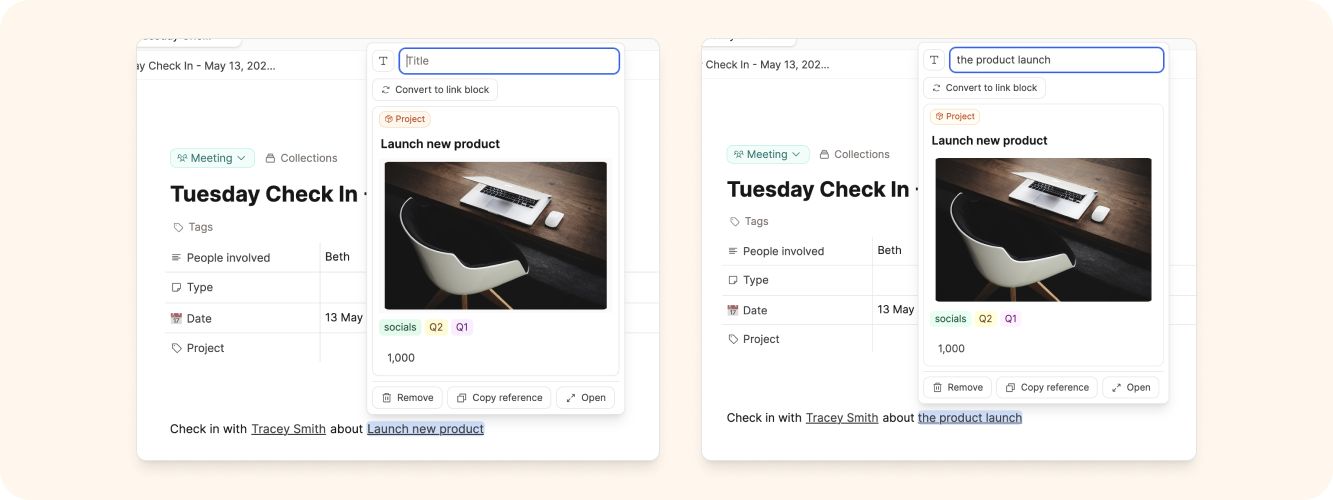
Edit name

Editing & Content

Questions about editing, linking, formatting, and organizing your content in Capacities.

How do I turn text or blocks into a new object?

To turn text or blocks into a new object in Capacities:

Capacities Documentation • © 2026